

This article describes the course of actions you should take
- if your database somehow got “suspect mode” or “emergency mode”;
- if you receive the error 1813 on attaching database
The History Behind
I’ve been developing under SQL 7 for a while. Sometimes transaction log grew too large. My usual fix for that problem was:
- stop the server (on the development machine we do not need any logs),
- delete transaction log
- start the server again
- after that the server was creating empty 1MB transaction log from scratch
I had been using this technique a lot of times under SQL 7, until sometime I have migrated to MSSQL 2000…
After my transaction log grew too large, I stopped the server, deleted the log file and started the server once again. However this time it did not worked: my database got “suspect”. I was not able to read or write from the database. A week of work seemed to be lost… Ouch!…
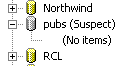
I searched the newsgroups – a lot of people were facing the same problem and nobody knew the solution. All I found was the article: http://support.microsoft.com/support/kb/articles/q251/6/28.asp. I have tried that and revealed information in the article applies only to SQL 7 and does not to SQL 2000…
Did I solved the problem? Read on!
“Suspect Mode” –> “Emergency Mode”
Open Enterprise Manager,
- Right click onto your server node, – an SQL Server Properties dialog will popup,
- Enable “Allow modifications to be made directly to the system catalogs” option
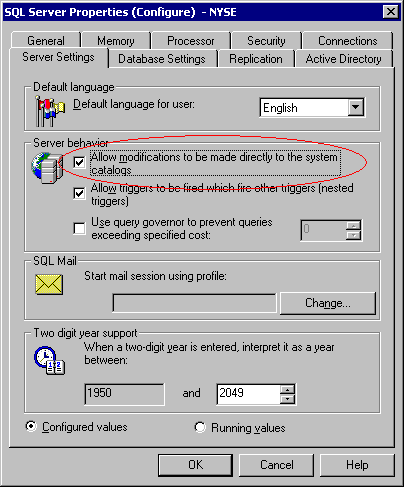
3. Now proceed to the sysdatabases table in the master database, locate your database row and put 32768 into its status column
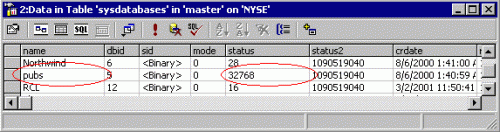
4. Restart SQL Server and refresh Enterprise Manager
Open Enterprise Manager – the database will be marked as “Emergency Mode”
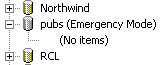
These articles explain the trick behind suspect and emergency mode:
http://support.microsoft.com/support/kb/articles/Q165/9/18.ASP
http://www.swynk.com/friends/knight/unmarksuspect.asp
http://support.microsoft.com/support/kb/articles/Q180/5/00.asp
“Emergency Mode” –> “Normal Mode”
Now your database is in “emergency mode”. Disregard Enterprise Manager does not show tables, views and procedures – use Query Analyzer’s Object Browser instead.
“Emergency mode” means database is locked against any modifications, it is readonly forever. There is no way to bring “emergency” database back to normal state. All we can do is copy all data from it into new database.
- Create new database (pubz)

- Create new DTS package
- Use “Copy SQL Objects” task to transfer data from old database to new database (pubs->pubz)

- Execute the DTS job & enjoy!
Note that there might be complex dependencies between database objects, so Copy SQL Objects task might not work properly. For example: view A is dependent on view Z; Copy SQL Objects task will try to create view A first, — that will fail, because view Z does not exist yet.
“Error 1813” –> “Suspect Mode”
If you receive “Error 1813”, this probably means that you are trying to attach database you have improperly detached, or haven’t detached at all. Only successfully detached databases can be successfully attached back.

- Create new database using the same name and file location as database that is failing to attach
- Stop SQL Server
- Copy non-attachable data files over the new ones
- Delete log files
- Start SQL Server
Open Enterprise Manager – the database will be marked as “suspect”

Once your database is “suspect”, use instructions outlined above…
Note that database will be marked “suspect” only if transaction log contained active sections. To illustrate the problem for 100%, run a few inserts against the database before deleting transaction log.



Leave a Reply